

Quick Start Guide
Dorico Edition
Cantai renders expressive vocal performances directly from your Dorico score. No manual phoneme editing, no fiddling with MIDI — just write your music and hear it sung.
What Cantai Does
Cantai reads your score — notes, lyrics, dynamics, tempo, expression markings — and generates a realistic sung vocal performance. It works inside Dorico as a dedicated playback device, so your vocal parts play back through Cantai automatically alongside the rest of your ensemble.
System Requirements
macOS
- Apple Silicon (M1 or later) — macOS 14 Sonoma or later
- Intel — macOS 13.4 Ventura or later (renders on the CPU, slower than Apple Silicon)
Windows
- Windows 10 (2020 update) or later
- x86-64 processor
Installation & Activation
- Create a free account at cantai.app (or log in if you already have one).
- Go to Downloads and download the installer for your OS, then run it.
- Launch Dorico — Cantai will appear as an available playback device.
- Open your Profile page to find your license key.
- Paste the license key from your Profile into the Cantai VST interface and click Activate.


Setting Up a Vocal Part
1. Add lyrics to your score
Select the first note in your vocal part and press Shift+L to open the lyrics popover. Type your lyrics, pressing Space to advance after a complete word, or - (hyphen) to advance after each syllable of a multi-syllable word.
2. Load Cantai in Play mode
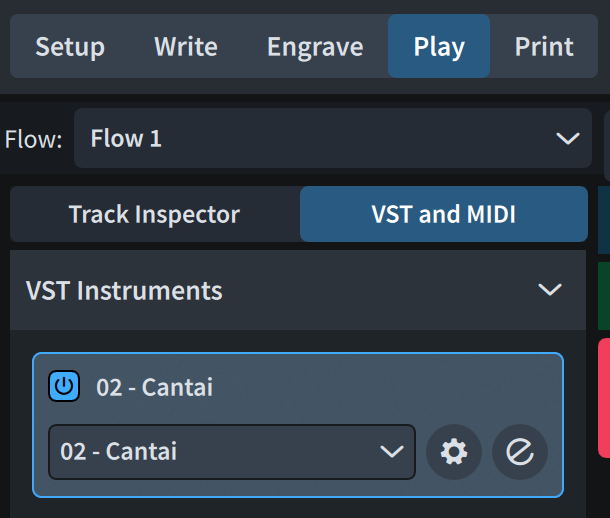
Switch to Play mode and open the VST and MIDI tab. Load one Cantai instance for each vocal stave you want Cantai to sing.
3. Assign it in the Track Inspector
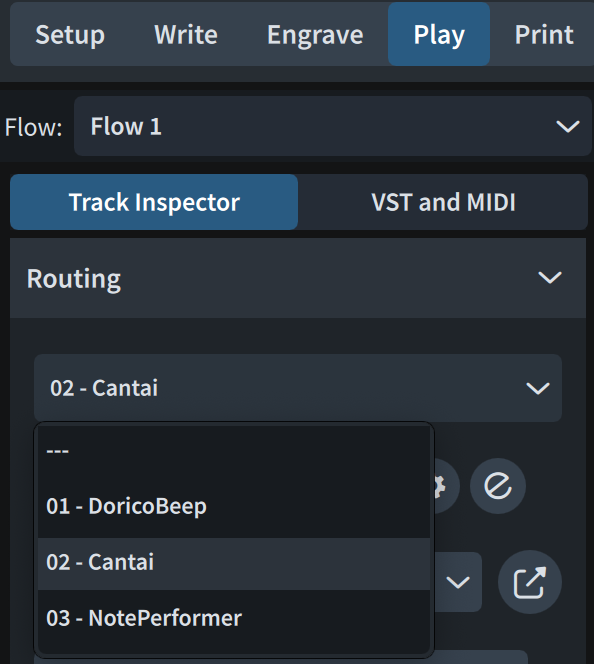
Click the Track Inspector tab and select the Cantai instance you just added. Dorico connects it to the corresponding voice automatically.
4. Press Play
That's it. Whenever you change anything that affects a vocal part — notes, lyrics, dynamics, tempo, or expression — Cantai automatically re-renders just the affected segments. No manual refresh needed.
Choosing a Voice
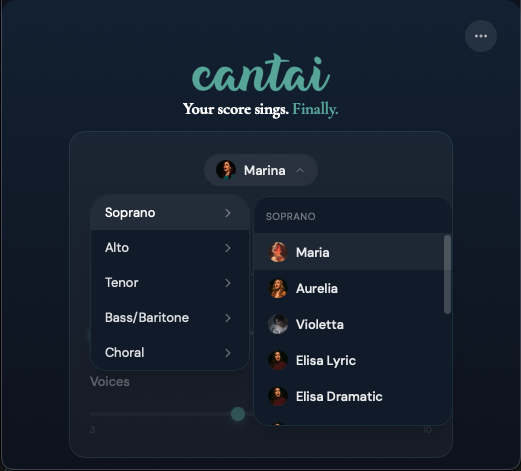
To change the voice assigned to a Cantai instance, click the Show Instrument button  next to the instance in the VST and MIDI panel. Select your preferred voice from the dropdown in the Cantai interface.
Choral Voices
Cantai includes two dedicated choir voices — Choir — Female and Choir — Male — which render a full choral section rather than a single singer. To set the number of voices per part (3–10), open the menu in the Cantai VST interface and adjust the choir section count.
The menu also provides Clear Cache and Reset Instance Settings options if you need to troubleshoot or start fresh.
Supported Languages
Cantai currently supports English and Latin, with more languages coming in subsequent updates.
Language is detected automatically from your lyrics. For best results, ensure your lyrics are spelled correctly — Cantai's phoneme engine derives pronunciation directly from the text.
Dynamics and Expression
You do not need to draw in any MIDI automation. Write your score the way you would for human performers, and Cantai interprets it.
Dynamic markings     p, mp, mf, f, ff, etc.
Hairpins             crescendo, decrescendo
Tempo markings       Allegro, Andante, ritardando, etc.
Tips for Best Results
- after each syllable to advance to the next note.
Exporting Audio
- Choose File > Export > Audio
- Select the flows and players you want to include
- Choose your format — WAV for highest quality, MP3 for smaller file size
- Click OK to export
Cantai audio exports at full quality — the same engine used for real-time playback renders the final file.
Reporting Issues
If something isn't working, reach us through the Help chat button in the bottom-right corner of any page on cantai.app. Please include your log files — drag them into the Help chat window:
macOS
Server log: ~/.cache/Cantai/stderr.txt
VST log:    ~/.cache/Cantai/VST.log
Replace ~ with your home folder, e.g. /Users/yourname
Windows
Server log: %LOCALAPPDATA%\Cantai\stderr.txt
VST log:    C:\Users\yourname\.cache\Cantai\VST.log
Replace yourname with your Windows username
Licensing
Cantai for Dorico requires a lifetime license — unlimited installs, free updates.
View pricing and get your license →Cantai is made by Turing Opera Workshop. We build tools for composers who take vocal writing seriously.